Good Food: Recipe Finder
- 3.7
- Rating
- 1.00M
- Installs
- Free
- Price

 Analysis by App-foxy
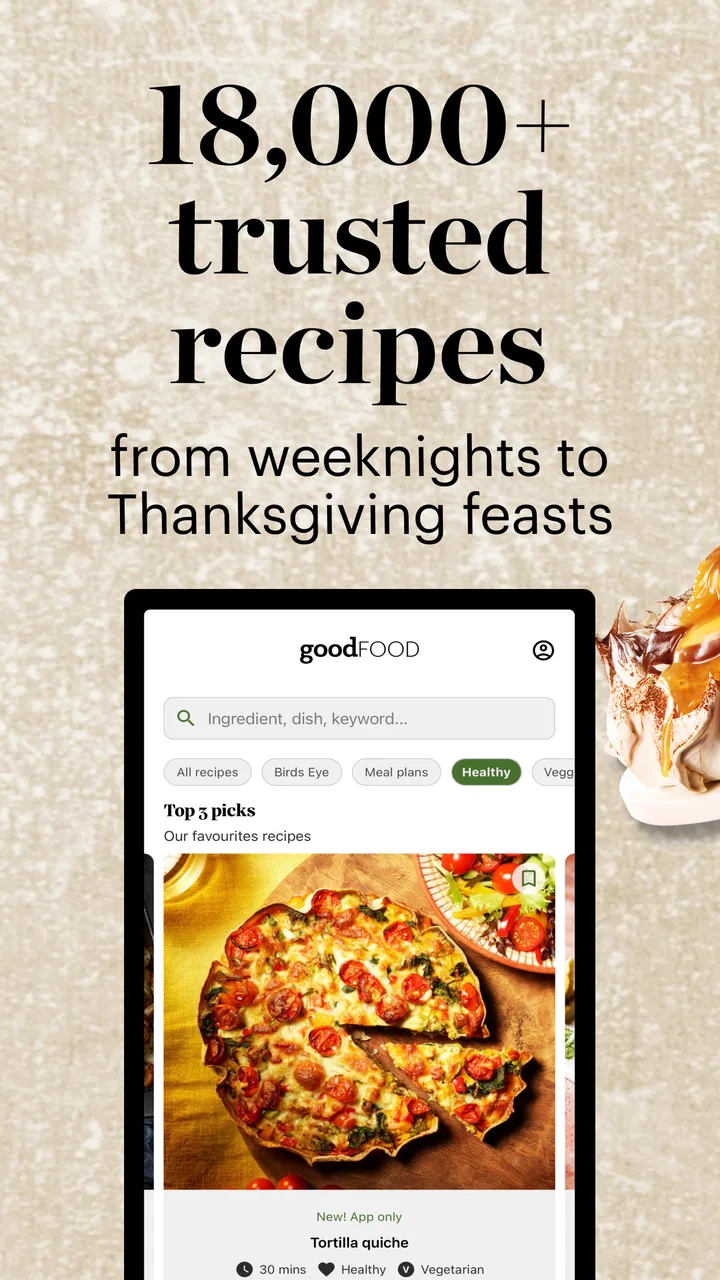
I opened Good Food: Recipe Finder expecting a straightforward way to browse recipes, but I quickly found that its appeal depends on how you like to plan meals. This is a News & Magazines app from Immediate Media Co, built around Good Food content rather than a general-purpose cooking utility. In my first week, I enjoyed the feeling of having a large stream of meal ideas in one place, especially when I knew I wanted to cook but had no clear answer to the familiar question: “What should I make tonight?”
The app is free to install, and its audience is broad enough to include casual cooks, busy households, and people who like discovering recipes through editorial content. It is rated for Everyone, runs on Android 8.0 and later, and has passed the one-million-install mark. Those details make it easy to try, but they do not automatically make it a lasting part of a cooking routine. The more important question is whether the app helps you return to meals you will actually make, rather than simply encouraging you to keep browsing.
What the first week feels like
The strongest early experience is discovery. Good Food: Recipe Finder gives me a reason to open the app even when I am not shopping for a particular ingredient. I can move from one idea to another, compare different styles of meals, and use the editorial presentation as a source of inspiration. That is a different experience from opening a blank search box and trying to invent the right wording for a recipe search.
You May Also Like

 Blood Strike: 2.5 Anniversary
Blood Strike’s Loadouts Turn Every Drop Into a Tactical Gamble
A close look at Blood Strike’s custom loadouts: how fast access to signature weapons reshapes its battle royale rhythm, rewards preparation, and narrows the gap between fights.

 Pandora - Music & Podcasts
Pandora’s Music Is Easy to Start, but Harder to Recover
Pandora’s strength is its low-effort path from a seed to a station. Its weak spot is how much confidence it asks you to place in connection, setup, and quiet recovery.

 8 Ball Pool
 Is Built on Rivalries, Rematches, and Routine
A close look at the rivalries, rematches, shared routines, and unanswered safety questions that turn a quick pool match into a persistent mobile community.

 Samsung Music
’s Quiet Strength Is Playing What You Already Own
Its reach comes less from spectacle than from dependable access to a personal library. That simplicity is both the app’s strongest retention engine and its ceiling.

 AccuWeather: Weather Radar
AccuWeather Review: A Quick, Clear Forecast for Everyday Decisions
For everyday plans, the best forecast is the one you can understand quickly. AccuWeather makes rain timing, radar, and local conditions easy to act on, with a few trade-offs.

 Hill Climb Racing
Why Hill Climb Racing Still Turns Crashes Into One More Run
A tiny car, a bumpy hill and one more upgrade: Hill Climb Racing keeps resurfacing because its simple chaos makes every near-miss feel personal.
More From Our News Desk



I found this especially useful at the end of a workday. If I had a little time to cook but did not want to repeat a familiar meal, browsing was more productive than scrolling through unrelated social media. A recipe can trigger a practical decision: use the vegetables already in the refrigerator, plan something suitable for a relaxed weekend, or choose a dessert to finish a family meal. The app works best when I treat it as a menu of possibilities rather than as an automatic meal planner.
The store summary highlights a summer meal plan by Divya Sharma, with an emphasis on nourishing food and dessert. That combination says something useful about the app’s character: it is not presenting cooking as a narrow exercise in restriction. For me, the balance matters. A recipe collection feels more usable when it includes everyday nourishment alongside food that is simply enjoyable.
One practical tip is to use the first few sessions to identify your own browsing pattern. Some people should begin with a meal occasion, such as weekday dinner or weekend baking. Others will get more from starting with an ingredient they already own. If you browse without a decision in mind, the app can become entertaining but not especially useful. I had better results when I opened it with a small constraint.
That constraint can be as simple as “I need something suitable for tonight” or “I want to use what is already here.” It changes the app from a stream of attractive possibilities into a tool for reducing decision fatigue. This is one of the less obvious strengths of an editorial recipe app: the writing and presentation can help me choose a direction before I have worked out the exact dish.
Where it differs from ordinary search
A standard web search is often faster when I know exactly what I want. If I need a particular dish, a specific dietary adjustment, or a recipe based on a very unusual ingredient, a search engine may give me a broader range of answers. Good Food: Recipe Finder is more pleasant when I want curated inspiration and a coherent cooking destination instead of a page of mixed-quality results.
That distinction also creates a trade-off. Search engines make it easy to compare many sources, while this app gives the Good Food experience a more focused identity. I prefer the app when I want to browse with confidence in the editorial voice. I would choose the usual web route when I need to cross-check several versions of a recipe or solve a very specific cooking problem quickly.
Compared with a dedicated meal-planning app, this is less about building a complete household system and more about finding recipes worth considering. A planning service may be better for scheduling meals, organizing a shared calendar, or managing a shopping workflow. Good Food: Recipe Finder earns its place earlier in the process, at the moment when I need ideas and a reason to cook something different.
The first-week test I recommend
Rather than judging the app by how many recipes I can browse, I would judge it by what happens after browsing. During the first week, I would save or note a small number of genuinely realistic candidates, then see whether they fit my available time, equipment, and appetite. This avoids the common trap of collecting ambitious recipes that never leave the screen.
I would also test it in three situations: a rushed weekday, a normal evening with some cooking time, and a slower day when I want to try something new. That gives a more honest picture than using it only when I am in an enthusiastic mood. An app that works only for weekend inspiration may still be enjoyable, but it probably will not become a daily kitchen habit.
What remains useful after the novelty
After the initial excitement fades, the app’s value depends on whether its recipe discovery continues to match real life. I do not need endless novelty every month. I need a dependable way to escape repetitive meals without creating more planning work than the meal itself. Good Food: Recipe Finder can provide that nudge, particularly for cooks who enjoy editorial selection and prefer choosing from ideas rather than designing meals from scratch.
The recurring value is strongest when I use it as a rotation tool. Instead of opening it every day and hoping for inspiration, I can check it when planning a few meals, pick one dependable option and one more interesting option, and then stop browsing. This approach protects my time and makes the app support a habit rather than compete with it.
A useful workflow is to separate inspiration from commitment. First, browse and identify dishes that sound appealing. Then ask practical questions before deciding: Do I have the main ingredients? Will the preparation fit the evening? Is this something the people eating it will actually want? The app can help with the first question of what to cook, but I still need to make the final judgment based on my kitchen and schedule.
This is also where the app may suit households differently. A single cook who chooses meals independently can move quickly from discovery to action. In a family, the app may be more valuable as a conversation starter: show two or three possibilities and let everyone agree before shopping. It does not remove negotiation, but it can make the discussion more concrete than asking an empty room what everyone wants.
The published average rating is 3.7 from around 8,200 ratings, while the app has about 75 written reviews. I read that as a sign to keep expectations measured. There is enough adoption to suggest that the concept works for many people, but the experience is not universally compelling. For me, that makes sense because recipe browsing is highly personal: one person sees useful inspiration, while another sees an unnecessary extra step between hunger and dinner.
The current version is 487.3.0, so users who already have the app should keep an eye on updates through their normal app store routine. I would not install it solely because a version number looks current; I would install it if the Good Food editorial approach matches the way I like to choose meals. Version information matters for compatibility, but recurring usefulness comes from the content and the habit built around it.
Who gets lasting value from it
I think it has the best chance of staying on a phone used by someone who enjoys cooking but regularly runs out of ideas. It also suits people who like recipes presented as part of a food publication rather than as isolated entries in a utility. If you enjoy planning a pleasant meal, browsing seasonal inspiration, or finding a dessert to complete a menu, the app has a clear role.
It is less convincing for someone who already has a fixed weekly meal system and rarely changes it. It may also be a poor fit if your priority is strict nutritional tracking, highly specialized dietary filtering, or detailed shopping automation. In those situations, a dedicated nutrition, planning, or grocery app will probably do more of the important work.
Another realistic limitation is that inspiration can become a form of procrastination. I have used recipe collections where the browsing itself felt productive, even though I ended the session no closer to dinner. With this app, I recommend setting a stopping point: choose a dish, write down what you need, and close it. The app is most valuable when it moves me toward cooking, not when it gives me another feed to consume.
Maintenance, recurring effort, and points of fatigue
Good Food: Recipe Finder has a relatively light maintenance burden if I use it only for discovery. I do not need to turn every session into a detailed planning exercise. A quick browse can be enough to find an idea, and the app’s free entry point makes occasional use easy. That makes it more forgiving than services that demand a complete profile or a fully organized meal schedule before they become useful.
However, light maintenance is not the same as no maintenance. I still need to translate an appealing recipe into a realistic plan. I need to check the cupboard, consider preparation time, and decide whether the dish fits the people I am feeding. If I expect the app to manage those decisions automatically, I may find it disappointing. Its strength is helping me choose, not taking over the entire kitchen routine.
In-app purchases range from $4.49 to $27.99 per item. That is important when deciding whether the free experience is enough for you. I would begin without spending money and first test whether I return to the app naturally. If the free browsing experience already supplies enough ideas, there is no reason to pay simply because additional content is available. If you are considering a purchase, judge it by how often you expect to cook from it, not by the number of recipes it might add to your reading list.
My practical rule would be to wait until the app has helped with several real meals before buying anything. That gives me evidence about whether the recipes fit my cooking style and whether I can follow through. It also prevents a common mistake: paying for more inspiration when the real problem is not a shortage of recipes but a shortage of time, ingredients, or planning space.
The main source of fatigue is choice overload. A large recipe collection can make dinner feel more complicated rather than less. I noticed that the app is easier to live with when I approach it with a purpose and leave once I have found a suitable option. Browsing indefinitely weakens its practical value, especially on busy evenings.
A second source of fatigue is the gap between editorial appeal and everyday logistics. A beautifully presented dish may be exactly what I want to cook in theory, but not what I can manage after work. The solution is not to dismiss the app; it is to pair inspiration with a strict reality check. Before committing, I ask whether I have the time, the key ingredients, and the energy to complete the recipe.
A third issue is repetition in personal use. Even a broad recipe service can feel repetitive if I always browse the same type of meal. I get more lasting value by deliberately changing the question: one session for quick dinners, another for a dessert, another for using a particular ingredient. That small shift keeps the app from becoming a loop of familiar choices.
How I would fit it into a monthly routine
For long-term use, I would not keep the app open as a constant source of food content. I would give it a defined job once or twice during a planning cycle. I might browse before shopping, select a couple of meals, and then return only when I need a fresh idea. This keeps the app’s novelty useful without allowing it to become another attention-hungry feed.
I would also keep a simple personal record of meals that worked. That record does not need to live inside the app. A note on the phone with successful dishes, useful substitutions, and meals the household rejected can make future browsing faster. Over time, the app supplies discovery while my own notes supply memory. That combination is more effective than expecting any recipe service to know my preferences perfectly.
For a beginner, I would start with familiar cooking techniques and ingredients, even if the app presents more adventurous possibilities. A successful first meal builds trust; an overly ambitious choice can make the whole experience feel harder than it is. For an experienced cook, the app may be more valuable as a prompt to vary a routine or explore a different menu direction.
My long-term verdict
Good Food: Recipe Finder earns lasting space when I use it as an editorial source of practical inspiration, not as a complete replacement for search, meal planning, or grocery management. The free app is easy to try, its Everyone rating makes it broadly accessible, and its Good Food identity gives browsing a more focused feel than a random collection of search results. Immediate Media Co has created something that can make the first step toward cooking feel easier.
My recommendation is strongest for people who enjoy food ideas but struggle with deciding what to make. It is also a good companion for someone who wants a little more variety without committing to a complicated planning system. The summer meal plan by Divya Sharma, with nourishing dishes and dessert, captures the kind of balanced inspiration I found most appealing: food that can support everyday eating while still feeling enjoyable.
I would skip it if I need precise dietary management, automatic household scheduling, or a powerful ingredient-inventory system. I would also skip it if I already have a reliable recipe source and never browse for ideas. In those cases, another app or a well-organized personal collection may be faster and more focused.
For everyone else, I suggest a simple trial: use it for one ordinary week, not just a relaxed weekend, and measure success by meals actually cooked. If it helps you choose dinner, reduces repetition, and gives you inspiration without creating a new chore, it deserves a regular place on your device. If you keep browsing but never act, the problem is probably not a lack of recipes.
My final view is that Good Food: Recipe Finder has recurring value, but only when I give it a clear role. It is a friendly discovery tool with the editorial feel of a food magazine, and that makes it more enjoyable than a bare search box for many situations. Its lasting appeal comes from returning with a purpose, choosing realistically, and letting the app lead to the kitchen rather than keeping me trapped in the browse screen.
FAQs for Good Food: Recipe Finder
01What features does Good Food: Recipe Finder offer?
Good Food: Recipe Finder provides a vast collection of recipes categorized by cuisine, dietary preferences, and cooking time. It includes features like meal planning, shopping lists, and step-by-step cooking instructions. Additionally, users can upload their own recipes and share them with the community, making it a social experience.
02Is Good Food: Recipe Finder free to use?
The app offers a free version that includes basic features such as recipe search and meal planning. However, there is a premium subscription available that unlocks additional features like exclusive recipes, ad-free browsing, and advanced nutritional insights. Users can choose based on their needs and preferences.
03Can I use Good Food: Recipe Finder offline?
Good Food: Recipe Finder requires an internet connection to access the full database of recipes and to sync user data. However, users can download specific recipes and shopping lists for offline access, ensuring that you can cook and shop even without a connection.
04How does Good Food: Recipe Finder handle dietary restrictions?
The app allows users to filter recipes based on various dietary restrictions such as vegan, gluten-free, keto, and more. This feature helps users easily find recipes that fit their dietary needs, making meal planning simpler for those with specific dietary requirements.
05Is Good Food: Recipe Finder available for both Android and iOS devices?
Yes, Good Food: Recipe Finder is available for download on both Android and iOS platforms. Users can find it on the Google Play Store and the Apple App Store, ensuring accessibility across different devices for a wide range of users.
Pros
- User-friendly interface for easy navigation.
- Extensive collection of diverse recipes.
- Customizable meal planning features.
- Offline access to saved recipes.
- Integrated grocery list functionality.
Cons
- Limited dietary preference filters.
- Occasional app crashes during use.
- Some recipes lack detailed instructions.
- Ads can be intrusive in free version.
- No option for direct ingredient delivery.

Good Food: Recipe Finder
Gallery